Home Assistant
Works with conditions
Reviewed guide
A documented connection is available. Check its equipment, account, firmware and feature requirements.
Home Assistant via Lutron Caseta Smart HubGetting specifications, connection paths, and resources ready.
Model: PD-3PCL-WH · White
Indoor 120 V plug-in lamp dimmer controlling up to two lamps together: 100 W combined compatible dimmable LED/CFL or 300 W incandescent/halogen, with a mixed-load table. Local buttons work standalone; Home Assistant control uses a supported Lutron Caseta hub.
Catalog-level details. Controllers, bridges, accounts, and available features depend on the connection route.
Confirm the exact variant before choosing. Store prices and availability can change; product-information pages are not store offers.
What to know about this device before choosing a connection.
A recommendation is not recorded yet. Compare the requirements below with your home and the capabilities you need.
Lighting only, not an appliance plug. Both receptacles share one dimming channel and one total load limit. Do not control motor-driven or transformer-supplied appliances. Use compatible dimmable bulbs and the manufacturer mixed-load table; switching mode does not turn this into an appliance relay. Indoor 0-40 C, 0-90% RH non-condensing. Leave lamp switches on and use a constantly powered standard outlet. No rewiring is required for normal plug-in installation. Smart hub and Pico remote are sold separately. Lutron account, current app and Internet are needed for new hub activation; documented HA everyday control is Local Push. Exact minimum firmware, device OTA, physical button events and energy telemetry are unknown. Documentation reviewed, not hardware tested. Retailer technical errors are held/rejected; user-specific stock is not verified.
Check your ecosystem, then choose a connection method for its requirements and available controls.
A documented connection is available. Check its equipment, account, firmware and feature requirements.
View full compatibility details →Compatibility has not been established for this exact model. This does not mean it is incompatible.
View full compatibility details →Compatibility has not been established for this exact model. This does not mean it is incompatible.
View full compatibility details →Compatibility has not been established for this exact model. This does not mean it is incompatible.
View full compatibility details →Compatibility has not been established for this exact model. This does not mean it is incompatible.
View full compatibility details →Compatibility has not been established for this exact model. This does not mean it is incompatible.
View full compatibility details →Compatibility has not been established for this exact model. This does not mean it is incompatible.
View full compatibility details →A listed ecosystem is a starting point. Connection methods and exposed capabilities must be checked for the exact variant.
Reviewed guide
A documented connection is available. Check its equipment, account, firmware and feature requirements.
Home Assistant via Lutron Caseta Smart HubNo verified evidence yet
Compatibility has not been established for this exact model. This does not mean it is incompatible.
No verified evidence yet
Compatibility has not been established for this exact model. This does not mean it is incompatible.
No verified evidence yet
Compatibility has not been established for this exact model. This does not mean it is incompatible.
No verified evidence yet
Compatibility has not been established for this exact model. This does not mean it is incompatible.
No verified evidence yet
Compatibility has not been established for this exact model. This does not mean it is incompatible.
No verified evidence yet
Compatibility has not been established for this exact model. This does not mean it is incompatible.
Missing documentation does not mean a device is incompatible. Reviewed documentation is not a physical hardware test.
Basic controls on the reviewed connection. Setup, remote access, voice services and firmware updates have separate requirements.
PD-3PCL-WH · US · Documentation reviewed. Check the unit’s hardware and firmware before setup.
Documented controls may have firmware or configuration conditions. Read the guide before relying on a feature.
Open setup guideInstallation & device requirements · Manuals & resources · All connection details
Choose a documented method. Requirements, controls, local/cloud behavior, and evidence stay attached to that route.
Home Assistant · US · PD-3PCL-WH
Documentation reviewed · 10/19/2026. Not tested on physical hardware.
Lutron PD-3PCL-WH lamp dimmer
To Lutron L-BDG2-WH or L-BDGPRO2-WH
Lutron L-BDG2-WH or L-BDGPRO2-WH
Local Ethernet/IP network
Home Assistant
Complete the required items before setup. Items marked “Not required” are optional for this route.
Documented
Use exact White US PD-3PCL-WH, UPC 784276072069; base PD-3PCL. Technical manuals apply via the primary identity mapping, not by counting kits/finishes as more devices.
Documented
120 V AC 50/60 Hz indoor only. Use up to two lamps controlled together: total 100 W compatible dimmable LED/CFL or 300 W incandescent/halogen, reduced by the mixed-load table. Minimum 10 W incandescent/halogen or one approved LED. No motors or transformer-supplied appliances. Leave lamp switches on and power the dimmer continuously.
Derived from documentation
Dimmer talks Clear Connect RF to the hub; hub connects by Ethernet. Home Assistant needs local network reachability. The plug is not directly joined to Wi-Fi or Thread.
Documented
Turn on each lamp and unplug it. Connect its cord to either side of the lamp dimmer; then plug the dimmer into a suitable standard always-powered outlet. Check local on/off and brightness using compatible lamps within the total load table. No wall rewiring is part of this procedure.
Documented
Connect Ethernet and supplied power, allow any update to finish, and follow current Lutron app discovery/account prompts, pressing the hub rear button when requested. Reuse a working already-commissioned hub instead of resetting it.
Derived from documentation
Follow the Lutron app prompts to add the PD-3PCL and assign a useful room/name. Verify on/off and dimming there first. Exact quick-start says to complete all remaining setup in the app; no undocumented fixed hold duration is inserted here. Standalone Pico pairing directions differ once the device is app-associated.
Derived from documentation
Supported plug-in dimmer light entity supplies normal light control; both receptacles respond together.
Derived from documentation
HA documents plug-in dimmers as dimmable lights. Only compatible bulbs within model-specific limits; no universal 1% floor or flicker-free guarantee.
Documented
The dimmer itself has On, Off, Brighter and Darker controls; these operate locally without a hub. Optional Pico is separate hardware.
Documented
New vendor hub onboarding needs Lutron account/app/Internet; device association and HA integration follow. Local physical-only use is a separate no-hub configuration, not the HA route.
Documented
HA explicitly classifies the integration as Local Push. Lutron documents hub local operation when Internet is down. Successful normal control still depends on the powered hub, reachable LAN, HA host and RF range; it is not a hardware outage test.
Derived from documentation
Lutron remote app access uses its supported Internet service. Access to HA from outside the home requires a separately configured secure HA remote-access method; no direct unauthenticated exposure or free subscription is implied.
Derived from documentation
Vendor hub/app documents scheduled events and scenes. HA automations depend on the running host and all chosen triggers/actions; cloud-linked triggers may still need Internet. No standalone built-in scheduler is inferred for the plug.
Documented
ui_or_documented_manual_certificates
Use the normal UI path first. HA also documents advanced manual configuration with certificate/private-key files and existing-file pairing when physical hub access is unavailable. Those files are sensitive and are not needed in this research packet; no files are generated or exposed.
Derived from documentation
not_matter
This reviewed route is Clear Connect RF plus Lutron hub, then the built-in HA integration. A hub HomeKit accessory code is not a PD-3PCL Matter code. No direct Matter route is claimed.
Documented
together
Both plugged-in lamps are controlled together, not independently addressable outputs.
Not yet verified
No exact model/hub/HA minimum firmware version established; leave unknown.
Documented
Published HA integration documentation explicitly supports Caseta plug-in dimmers through named hubs.
Derived from documentation
Editorial judgment: physical lamp installation is simple plug-in, but a new user still needs hub activation, app association and HA pairing. Existing hub owners have fewer steps.
Lutron · manufacturer · Checked 2026-10-19
US white single-device identity; plug-in design, 2 lamps and capacity; smart hub sold separately.
US white single-device identity; plug-in design, 2 lamps and capacity; smart hub sold separately.
Source location: Exact PD-3PCL-WH versus PD-3PCL-WH-C Canada; Features and Color Options
Lutron · manufacturer · Checked 2026-10-19
US PD-3PCL-WH maps to UPC 784276072069. Kit and two-count starter-kit identifiers are separate offers, not extra base models. MAP is not MSRP, inventory or transaction price.
US PD-3PCL-WH maps to UPC 784276072069. Kit and two-count starter-kit identifiers are separate offers, not extra base models. MAP is not MSRP, inventory or transaction price.
Source location: Printed p13 PD-3PCL-WH and starter-kit rows; p20 P-PKG1P kit rows
Lutron · manufacturer · Checked 2026-10-19
Exact PD-3PCL original manufacturer manual retained; English page visually reviewed. 120 V 50/60 Hz, indoor, 0-40 C, lamp-only restrictions and separate Pico/bridge. Historical publication date, currently linked by official instructions landing.
Exact PD-3PCL original manufacturer manual retained; English page visually reviewed. 120 V 50/60 Hz, indoor, 0-40 C, lamp-only restrictions and separate Pico/bridge. Historical publication date, currently linked by official instructions landing.
Source location: English p1: supplied contents, installation, controls, ratings, caution and lamp-load table
Compare the documented support source and effort for each route. Official/community support and local/cloud operation are separate questions.
Published HA integration documentation explicitly supports Caseta plug-in dimmers through named hubs.
Check status & evidenceEditorial judgment: physical lamp installation is simple plug-in, but a new user still needs hub activation, app association and HA pairing. Existing hub owners have fewer steps.
Check status & evidenceChoose a connection method for its app, account and controller requirements. An app used by one method is not necessarily required for every connection.
Controllers for the reviewed connections are listed below. These requirements do not apply automatically to other setup methods.
Open connection instructions Find manuals and installation diagramsSetup and software downloads have separate requirements from everyday local control. A completely offline setup has not been established by these summaries.
Requirements apply to this setup method.
New vendor hub onboarding needs Lutron account/app/Internet; device association and HA integration follow. Local physical-only use is a separate no-hub configuration, not the HA route.
Check evidenceA running Home Assistant instance on a network that can reach the supported Lutron hub.
Check evidenceCurrent integration lists Caseta hubs and supports wall and plug-in dimmers as light entities. This is documentation-backed compatibility, not a physical test.
Check evidenceNew hub activation requires a new or existing Lutron account, current Lutron app and Internet. A later local HA path does not remove these onboarding requirements. Existing correctly commissioned hubs need not be recreated.
Check evidenceUse L-BDG2-WH, or supported L-BDGPRO2-WH. Hub sold separately. PRO is not required merely for the documented built-in HA route. Do not substitute L-BDG1 based on generic Smart Bridge wording.
Check evidenceExpand a group to see all recorded attributes. Electrical maxima depend on load type; check operating and installation limits in the exact model documentation. Route-specific feature availability can differ. Missing fields are not a confirmed “No.”
Check the model, region, hardware revision, and document version. Connection-specific sources are linked in each guide.
Caseta Plug-In Lamp Dimmer (White) · PD-3PCL-WH · Archive started 2026-10-19. Individual additions may be newer. These files open from Dwelleno.
Original manufacturer pageExact US model documentation. Read the full installation and load restrictions; reviewed connection scope does not imply every feature or firmware revision was tested.
Original manufacturer files, including its safety instructions. Diagrams may show different AC and DC configurations; check the exact model and supply type.
Reviewed documentation, catalog records, and manufacturer observations have different scopes. A source for one capability does not establish every feature.
Connection guides preserve source dates, publishers, review status, and claim-level links. “Documentation reviewed” does not mean tested on physical hardware.
Documentation reviewed Oct 19, 2026 · PD-3PCL-WH · US
Other active devices in this category. Their connection requirements and capabilities may differ.
10EBO901 · Smart Plugs
The premium Apple Home plug. Thread-native, zero cloud, real-time energy monitoring, full local control. No hub needed if you have a Thread border router (HomePod mini, Apple TV 4K). The best plug for Apple Home users.
Recorded scores: Overall 8.7/10 · Value 7.4/10
Explore connectionsDocumented
A running Home Assistant instance on a network that can reach the supported Lutron hub.
Derived from documentation
Current integration lists Caseta hubs and supports wall and plug-in dimmers as light entities. This is documentation-backed compatibility, not a physical test.
Documented
Use L-BDG2-WH, or supported L-BDGPRO2-WH. Hub sold separately. PRO is not required merely for the documented built-in HA route. Do not substitute L-BDG1 based on generic Smart Bridge wording.
Documented
New hub activation requires a new or existing Lutron account, current Lutron app and Internet. A later local HA path does not remove these onboarding requirements. Existing correctly commissioned hubs need not be recreated.
Documented
For new hub commissioning use an iOS/Android device with the current Lutron app on the same network. Do not treat 2019 mobile-OS minima as current support.
Documented
Use the discovered hub or Settings > Devices & services > Add Integration > Lutron Caseta, then follow the onscreen prompts. Keep access to the hub for physical authorization if requested. Do not confuse this with Matter QR commissioning.
Derived from documentation
Find the light entity using the Lutron app name; test on/off and several brightness levels, confirm both lamps respond together and check state updates. Optional local-outage verification must preserve local LAN power/connectivity; it is not claimed as completed here.
Not yet verified
Not established for exact PD-3PCL by reviewed documentation. Pico/keypad events and other Lutron devices do not establish this capability.
Not yet verified
Not established for exact PD-3PCL by reviewed documentation. Pico/keypad events and other Lutron devices do not establish this capability.
Documented
Lutron documents automatic/prompted hub updates and active Internet for update troubleshooting. This is not proof of PD-3PCL device OTA support.
Not yet verified
Do not equate hub firmware updates with a verified lamp-dimmer OTA mechanism.
Not yet verified
L-BDG1 is not listed among current HA-supported Caseta hubs; this route is not extended to it.
Documented
L-BDGPRO2-WH
Current HA list explicitly supports this second-generation PRO model. It is an alternative to L-BDG2-WH, not a requirement to purchase both.
Documented
US
Selected SKU PD-3PCL-WH is US; Canadian-C finish SKU and imported reviews remain separately scoped.
Documented
Default route assumes compatible dimmable lighting. Advanced on/off mode remains lighting-only and not a relay; exact converted-mode entity behavior is held.
Lutron · manufacturer · Checked 2026-10-19
Model-specific three-page original, currently linked from support article. All three pages visually reviewed. Two outputs are controlled together; capacity is total, not per outlet.
Model-specific three-page original, currently linked from support article. All three pages visually reviewed. Two outputs are controlled together; capacity is total, not per outlet.
Source location: p1 capacity/mixed-load table, two receptacles together; p2 power/environment/radio; p3 dimensions and controls
Lutron · manufacturer · Checked 2026-10-19
Current support clarifies forward-phase, integrated LED/CFL driver/ballast, minimum load, one range-extender limit and lighting-only switching-mode limitation.
Current support clarifies forward-phase, integrated LED/CFL driver/ballast, minimum load, one range-extender limit and lighting-only switching-mode limitation.
Source location: Features; Minimum Load; Programming; Range Extender; Advanced Programming
Lutron · manufacturer · Checked 2026-10-19
Distinguishes PD-3PCL dimming from PD-15OUT switching; requires constantly powered outlet. This packet does not prescribe altering household wiring.
Distinguishes PD-3PCL dimming from PD-15OUT switching; requires constantly powered outlet. This packet does not prescribe altering household wiring.
Source location: Controlling a Plug-in light
Lutron · manufacturer · Checked 2026-10-19
New hub activation needs current Lutron app, Lutron account, active Internet, Ethernet LAN and power; same-network app discovery, rear button and updates.
New hub activation needs current Lutron app, Lutron account, active Internet, Ethernet LAN and power; same-network app discovery, rear button and updates.
Source location: Before You Begin; Setting up a new Caseta Smart Hub
Lutron · manufacturer · Checked 2026-10-19
Caseta hub uses Clear Connect RF and Ethernet; local system works without Internet. L-BDG2-WH versus L-BDGPRO2-WH identities; 75-device hub capacity.
Caseta hub uses Clear Connect RF and Ethernet; local system works without Internet. L-BDG2-WH versus L-BDGPRO2-WH identities; 75-device hub capacity.
Source location: What is the Smart Hub; features; model comparison
Lutron · manufacturer · Checked 2026-10-19
Hub updates are vendor-managed; active Internet required for update workflow. No exact PD-3PCL minimum firmware or device OTA mechanism established.
Hub updates are vendor-managed; active Internet required for update workflow. No exact PD-3PCL minimum firmware or device OTA mechanism established.
Source location: Overview and Firmware Update Process
Lutron · manufacturer · Checked 2026-10-19
Historical original hub manual currently linked on PD3PCL instructions landing; hardware connection evidence, not current mobile-OS compatibility.
Historical original hub manual currently linked on PD3PCL instructions landing; hardware connection evidence, not current mobile-OS compatibility.
Source location: English p1: supplied power adapter and Ethernet; download app
Home Assistant · platform · Checked 2026-10-19
Built-in HA supports L-BDG2-WH and L-BDGPRO2-WH; plug-in dimmers become light entities. UI discovery/setup route distinct from advanced manual certificate route. Integration Local Push is not account-free onboarding.
Built-in HA supports L-BDG2-WH and L-BDGPRO2-WH; plug-in dimmers become light entities. UI discovery/setup route distinct from advanced manual certificate route. Integration Local Push is not account-free onboarding.
Source location: Supported Bridges; supported wall and plug-in dimmers; Configuration; Manual hub configuration; Light; Local Push
KP125M · Smart Plugs
Kasa Wi-Fi smart plug with manufacturer-documented Matter and Kasa-app energy monitoring; this reviewed guide covers the local TP-Link integration.
Recorded scores: Overall 8.6/10 · Value 9.4/10
Explore connectionsKasa / TP-Link US (official product information)
PLUGSPLUS · Smart Plugs
The best smart plug for Home Assistant users. Full local control via HTTP/MQTT/WebSockets, real-time energy monitoring, no cloud account needed. Can be scripted directly on the device. The HA enthusiast's plug.
Recorded scores: Overall 8.6/10 · Value 9.1/10
Explore connectionsKP115 · Smart Plugs
Reviewed guides: Home Assistant →
Kasa Wi-Fi plug with energy monitoring in the Kasa app; US electrical ratings are documented separately from other regions.
Recorded scores: Overall 8.3/10 · Value 9.7/10
Explore connectionsKasa / TP-Link US (official product information)
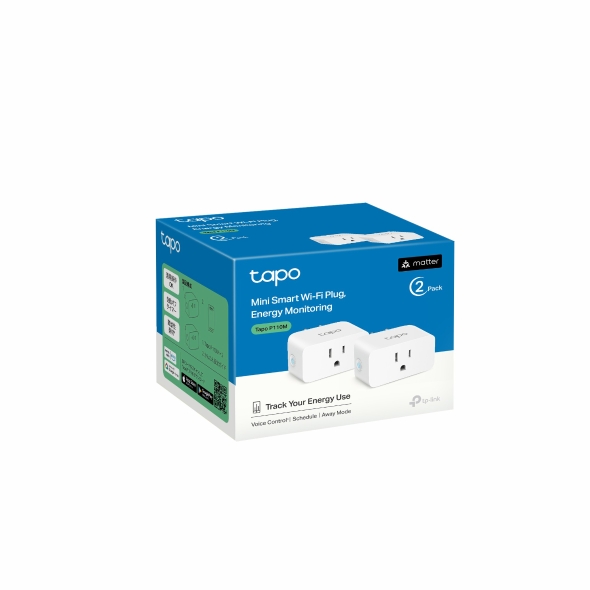
P110M · Smart Plugs
Reviewed guides: Google Home, Home Assistant →
A Tapo Matter-over-Wi-Fi plug with documented energy monitoring. Connection requirements and exposed readings depend on the selected ecosystem, hardware and firmware.
Recorded scores: Overall 8.2/10 · Value 9.2/10
Explore connections