Home Assistant
Works with conditions
Reviewed guide
A documented connection is available. Check its equipment, account, firmware and feature requirements.
Home Assistant via an existing Hue Bridge v2Getting specifications, connection paths, and resources ready.
Model: 552349 · White
US plug-in on/off control for a conventional lamp, using Bluetooth or a Hue Bridge. Manufacturer maximum is 1800 W of lighting; no dimming or appliance/fan-use recommendation. Selected Home Assistant guide uses an existing square Hue Bridge v2 over the local network.
Catalog-level details. Controllers, bridges, accounts, and available features depend on the connection route.
Confirm the exact variant before choosing. Store prices and availability can change; product-information pages are not store offers.
What to know about this device before choosing a connection.
A recommendation is not recorded yet. Compare the requirements below with your home and the capabilities you need.
Use only the exact US product and a suitable lamp within its rating. Other appliances can malfunction according to Hue support. Local HA control is distinct from first-time Hue app setup, account policy, firmware updates and remote access; those are not universally offline. No direct Matter or Thread claim. No live device test.
Check your ecosystem, then choose a connection method for its requirements and available controls.
A listed ecosystem is a starting point. Connection methods and exposed capabilities must be checked for the exact variant.
Reviewed guide
A documented connection is available. Check its equipment, account, firmware and feature requirements.
Home Assistant via an existing Hue Bridge v2No verified evidence yet
Compatibility has not been established for this exact model. This does not mean it is incompatible.
No verified evidence yet
Compatibility has not been established for this exact model. This does not mean it is incompatible.
No verified evidence yet
Compatibility has not been established for this exact model. This does not mean it is incompatible.
No verified evidence yet
Compatibility has not been established for this exact model. This does not mean it is incompatible.
No verified evidence yet
Compatibility has not been established for this exact model. This does not mean it is incompatible.
No verified evidence yet
Compatibility has not been established for this exact model. This does not mean it is incompatible.
Missing documentation does not mean a device is incompatible. Reviewed documentation is not a physical hardware test.
552349 · US · Documentation reviewed. Check the unit’s hardware and firmware before setup.
Documented controls may have firmware or configuration conditions. Read the guide before relying on a feature.
Open setup guideInstallation & device requirements · Manuals & resources · All connection details
Choose a documented method. Requirements, controls, local/cloud behavior, and evidence stay attached to that route.
Home Assistant · US · 552349
Documentation reviewed · 10/19/2026. Not tested on physical hardware.
Hue Smart Plug 552349 (US)
Existing Hue Bridge v2 (square)
To Home Assistant: Philips Hue integration
Home Assistant: Philips Hue integration
Complete the required items before setup. Items marked “Not required” are optional for this route.
Documented
Exact selected US plug. Bluetooth and Zigbee are documented; only Zigbee-to-Hue-Bridge is used here.
Documented
Plug must already be added to a functioning square Hue Bridge v2 through Hue app. Bridge is required for this HA route, even though Bluetooth app control is separately possible.
Derived from documentation
HA host must reach the Hue Bridge on the local network. Enter the bridge hostname/IP if discovery fails; plug itself is not a Wi-Fi device.
Documented
An existing Home Assistant host and access to its Settings are prerequisites.
Derived from documentation
Use only a suitable lamp within the North American 1800 W lighting maximum; leave its own switch on. Confirm it works in Hue on the existing Bridge before adding HA. If not commissioned, follow Hue smart-plug setup and any current account prompts first.
Documented
Accept discovered bridge or open Settings > Devices & services > Add integration > Philips Hue. Select the bridge or supply its local address if prompted.
Documented
When HA requests linking, press the button on the Bridge and complete the on-screen registration. This creates local integration access.
Derived from documentation
Find the plug light entity and test on/off with the lamp. Do not expect a brightness slider or electrical telemetry. Check actual behavior before creating automations.
Derived from documentation
Manufacturer exposes plug as a light; HA Hue integration exposes light resources, with on/off as base mode. Exact selected-device behavior is documentation inference, not hands-on verification.
Not supported for this route
Manufacturer explicitly says smart plug cannot dim or brighten a connected lamp.
Not yet verified
No exact primary evidence establishes power/energy entities here.
Derived from documentation
Manufacturer system commissioning precedes this route. HA uses local link-button registration; first-time Hue app account/internet requirement is not verified and must not be described as offline/account-free.
Derived from documentation
Square V2 bridges provide local event-stream updates and HA Hue is Local Push. Normal HA-to-bridge control stays on LAN.
Documented
Configure HA remote access separately, such as HA Cloud or a secure VPN. Hue cloud remote control is a different service.
Derived from documentation
HA rules using local entities can act locally; cloud or internet-based triggers/actions add dependencies. Hue schedules and HA automations are separate.
Not yet verified
HA release 2026.10.2 was inspected, not established as the minimum. Plug and Bridge minimum firmware are unverified.
Documented
Current Home Assistant-maintained integration, not a community custom component; no independent certification or physical test is claimed.
Derived from documentation
A configuration task once Hue Bridge, plug and HA are already commissioned; brand onboarding or network troubleshooting is additional work.
Philips Hue / Signify · manufacturer · Checked 2026-10-19
Exact US UPC 046677552343 / 12NC 929002240602; 100–120 V, Bluetooth and Zigbee, IP20, direct store offer. Commercial 552349 is mapped by B&H UPC, not printed in this source.
Source location: Features: product number, 12NC, mains, IP, communication protocol; Other: manual; direct offer and JSON-LD
Philips Hue / Signify · manufacturer · Checked 2026-10-19
Original pictorial North American setup manual linked by exact US PDP. Shows plug-in installation and separate Bluetooth/Bridge paths; not a full electrical-rating or safety leaflet.
Source location: Single PDF page; document 3222 639 08792; last update 04/2022; US receptacle drawing and app/Bridge/dimmer diagrams
Philips Hue / Signify · manufacturer · Checked 2026-10-19
North America maximum light load 1800 W; on/off only; other appliances can malfunction. Load value is not a motor, heater or generic appliance rating.
Source location: FAQ: maximum wattage light; other appliances; dim and brighten. JSON-LD acceptedAnswer plus cloud-browser expanded FAQ
Philips Hue / Signify · manufacturer · Checked 2026-10-19
Pair smart plug to an already configured Hue Bridge using Hue app. Search or serial-number fallback for no QR code. Separate Bluetooth instructions are not the HA bridge route.
Source location: Connect with a Bridge; Bluetooth setup instructions; No QR code fallback
Compare the documented support source and effort for each route. Official/community support and local/cloud operation are separate questions.
Current Home Assistant-maintained integration, not a community custom component; no independent certification or physical test is claimed.
Check status & evidenceA configuration task once Hue Bridge, plug and HA are already commissioned; brand onboarding or network troubleshooting is additional work.
Check status & evidenceSee how it can help your network and which other connection functions it offers. Each answer applies to its documented protocol and operating mode.
Mesh role not yet verified.
Power source and protocol support alone do not establish a routing role.
Choose a connection method for its app, account and controller requirements. An app used by one method is not necessarily required for every connection.
Controllers for the reviewed connections are listed below. These requirements do not apply automatically to other setup methods.
Hubs listed in the catalog:
Setup and software downloads have separate requirements from everyday local control. A completely offline setup has not been established by these summaries.
Requirements apply to this setup method.
Manufacturer system commissioning precedes this route. HA uses local link-button registration; first-time Hue app account/internet requirement is not verified and must not be described as offline/account-free.
Check evidenceAn existing Home Assistant host and access to its Settings are prerequisites.
Check evidenceUse the Home Assistant Philips Hue integration, not Hue BLE, Matter, ZHA, Zigbee2MQTT or a community integration.
Check evidenceThis route starts with a commissioned Hue system. HA pairing uses the local bridge link button and registers an app key, without a separate Hue-cloud login in the HA flow. This does not claim factory-new Hue-app setup is account-free; follow current Hue app account prompts.
Check evidencePlug must already be added to a functioning square Hue Bridge v2 through Hue app. Bridge is required for this HA route, even though Bluetooth app control is separately possible.
Check evidenceExpand a group to see all recorded attributes. Electrical maxima depend on load type; check operating and installation limits in the exact model documentation. Route-specific feature availability can differ. Missing fields are not a confirmed “No.”
This retained research note predates publication. See Connections above for current guide availability.
Check the model, region, hardware revision, and document version. Connection-specific sources are linked in each guide.
Hue Smart Plug (US) · 552349 · Archive started 2026-10-19. Individual additions may be newer. These files open from Dwelleno.
Original manufacturer pageExact US model documentation. Read the full installation and load restrictions; reviewed connection scope does not imply every feature or firmware revision was tested.
Original manufacturer files, including its safety instructions. Diagrams may show different AC and DC configurations; check the exact model and supply type.
Reviewed documentation, catalog records, and manufacturer observations have different scopes. A source for one capability does not establish every feature.
Connection guides preserve source dates, publishers, review status, and claim-level links. “Documentation reviewed” does not mean tested on physical hardware.
Documentation reviewed Oct 19, 2026 · 552349 · US
Other active devices in this category. Their connection requirements and capabilities may differ.
10EBO901 · Smart Plugs
The premium Apple Home plug. Thread-native, zero cloud, real-time energy monitoring, full local control. No hub needed if you have a Thread border router (HomePod mini, Apple TV 4K). The best plug for Apple Home users.
Recorded scores: Overall 8.7/10 · Value 7.4/10
Explore connectionsDocumented
Use the Home Assistant Philips Hue integration, not Hue BLE, Matter, ZHA, Zigbee2MQTT or a community integration.
Derived from documentation
This route starts with a commissioned Hue system. HA pairing uses the local bridge link button and registers an app key, without a separate Hue-cloud login in the HA flow. This does not claim factory-new Hue-app setup is account-free; follow current Hue app account prompts.
Not yet verified
Software-upgradable device is documented, but this exact plug/bridge update workflow and offline update capability were not established.
Philips Hue / Signify · manufacturer · Checked 2026-10-19
Hue account and internet lifecycle cannot be simplified to account-free setup. Page has time-relative upcoming-account language; local light control is distinguished from remote services.
Source location: Your privacy, our priority; account creation FAQ; control lights without internet
Home Assistant · platform · Checked 2026-10-19
Current HA docs support Hue-bridge lights, local event updates for square V2 bridges and built-in integration setup. Not an exact physical-device test.
Source location: Philips Hue integration: Configuration, Data updates, legacy V1 support, Local Push
Home Assistant maintainers · maintainer · Checked 2026-10-19
HA registration uses bridge host and local link-button app-key creation, not a Hue-cloud login. This review did not create a credential or pair a device.
Source location: HA tag 2026.10.2; async_step_manual; async_step_link
Home Assistant maintainers · maintainer · Checked 2026-10-19
Current UI instructs pressing the bridge button to register Hue with Home Assistant.
Source location: config.step.link.description
Home Assistant maintainers · maintainer · Checked 2026-10-19
Hue light resources are exposed as lights; ONOFF is the base color mode and brightness is enabled only if the resource supports dimming.
Source location: HA tag 2026.10.2; async_setup_entry and HueLight initialization
Home Assistant · platform · Checked 2026-10-19
Remote access is additional configuration. Local control does not itself provide away-from-home access.
Source location: Remote access: local default; Cloud and VPN
Home Assistant · platform · Checked 2026-10-19
Automations use entities; dependencies of chosen triggers and actions must be considered separately.
Source location: Automating Home Assistant; devices and entities
KP125M · Smart Plugs
Kasa Wi-Fi smart plug with manufacturer-documented Matter and Kasa-app energy monitoring; this reviewed guide covers the local TP-Link integration.
Recorded scores: Overall 8.6/10 · Value 9.4/10
Explore connectionsKasa / TP-Link US (official product information)
PLUGSPLUS · Smart Plugs
The best smart plug for Home Assistant users. Full local control via HTTP/MQTT/WebSockets, real-time energy monitoring, no cloud account needed. Can be scripted directly on the device. The HA enthusiast's plug.
Recorded scores: Overall 8.6/10 · Value 9.1/10
Explore connectionsKP115 · Smart Plugs
Reviewed guides: Home Assistant →
Kasa Wi-Fi plug with energy monitoring in the Kasa app; US electrical ratings are documented separately from other regions.
Recorded scores: Overall 8.3/10 · Value 9.7/10
Explore connectionsKasa / TP-Link US (official product information)
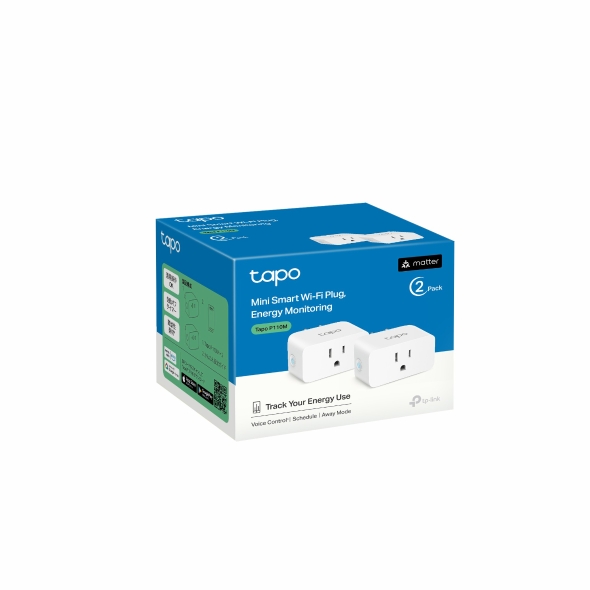
P110M · Smart Plugs
Reviewed guides: Google Home, Home Assistant →
A Tapo Matter-over-Wi-Fi plug with documented energy monitoring. Connection requirements and exposed readings depend on the selected ecosystem, hardware and firmware.
Recorded scores: Overall 8.2/10 · Value 9.2/10
Explore connections