Home Assistant
Works with conditions
Reviewed guide
A documented connection is available. Check its equipment, account, firmware and feature requirements.
Home Assistant via Matter (Wi-Fi)Getting specifications, connection paths, and resources ready.
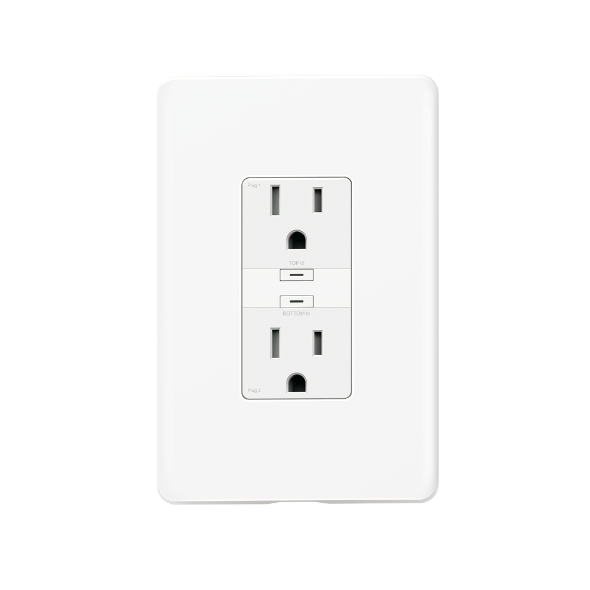
Model: P210M
An in-wall Matter-over-Wi-Fi outlet with two separately controlled receptacles and Tapo energy monitoring. It requires a neutral wire and qualified installation. Matter setup needs a controller for the chosen ecosystem.
Catalog-level details. Controllers, bridges, accounts, and available features depend on the connection route.
Tapo US (official product information). Confirm the exact variant before choosing. Store prices and availability can change; product-information pages are not store offers.
What to know about this device before choosing a connection.
A recommendation is not recorded yet. Compare the requirements below with your home and the capabilities you need.
Two separately controlled receptacles and Tapo app energy monitoring are documented. Product scheduling and Away Mode do not establish the same features through Home Assistant or Google Home. The page lists only two dimension values under a three-axis label; complete dimensions remain unverified. Follow the manufacturer guide for load-specific limits, neutral/ground requirements and installation. The US specification lists a device maximum of 15 A and 1875 W; these are not universal appliance ratings or separate full-load allowances for each receptacle. The US guide gives lower limits for lamps, electronics, fans and motors, including 1/2 HP for a motor/compressor, and excludes EV charging. Follow the exact unit guide. Complete product dimensions remain unverified; outlet-box clearance is not the product size.
Check your ecosystem, then choose a connection method for its requirements and available controls.
A documented connection is available. Check its equipment, account, firmware and feature requirements.
View full compatibility details →Compatibility has not been established for this exact model. This does not mean it is incompatible.
View full compatibility details →A documented connection is available. Check its equipment, account, firmware and feature requirements.
View full compatibility details →Compatibility has not been established for this exact model. This does not mean it is incompatible.
View full compatibility details →Compatibility has not been established for this exact model. This does not mean it is incompatible.
View full compatibility details →Compatibility has not been established for this exact model. This does not mean it is incompatible.
View full compatibility details →Compatibility has not been established for this exact model. This does not mean it is incompatible.
View full compatibility details →A listed ecosystem is a starting point. Connection methods and exposed capabilities must be checked for the exact variant.
Reviewed guide
A documented connection is available. Check its equipment, account, firmware and feature requirements.
Home Assistant via Matter (Wi-Fi)Catalog listing only
Compatibility has not been established for this exact model. This does not mean it is incompatible.
Reviewed guide
A documented connection is available. Check its equipment, account, firmware and feature requirements.
Google Home via Matter (Wi-Fi)Catalog listing only
Compatibility has not been established for this exact model. This does not mean it is incompatible.
Catalog listing only
Compatibility has not been established for this exact model. This does not mean it is incompatible.
No verified evidence yet
Compatibility has not been established for this exact model. This does not mean it is incompatible.
No verified evidence yet
Compatibility has not been established for this exact model. This does not mean it is incompatible.
Missing documentation does not mean a device is incompatible. Reviewed documentation is not a physical hardware test.
Basic controls on the reviewed connection. Setup, remote access, voice services and firmware updates have separate requirements.
P210M · US · Documentation reviewed. Check the unit’s hardware and firmware before setup.
Documented controls may have firmware or configuration conditions. Read the guide before relying on a feature.
Open setup guideInstallation & device requirements · Manuals & resources · All connection details
Choose a documented method. Requirements, controls, local/cloud behavior, and evidence stay attached to that route.
Compare what each reviewed connection exposes. These are documentation findings, not physical-device tests. Open conditions before choosing a method.
On smaller screens, scroll the table sideways. A missing claim stays “Not yet verified”.
| Feature or requirement | Google Home via Matter (Wi-Fi)Google Home · P210M · USReviewed Oct 12, 2026 | Home Assistant via Matter (Wi-Fi)Home Assistant · P210M · USReviewed Oct 12, 2026 |
|---|---|---|
| Controls & readings | ||
| Outlet on/off | SupportedDerived from documentationDetails & evidenceManufacturer Matter outlet documentation and Google’s On/Off Plug-in Unit support establish a documented control path. No physical-device test has been performed. Read this claim and its sources | SupportedDerived from documentationDetails & evidenceThe manufacturer documents a Matter-certified controllable smart outlet; Home Assistant's Matter controller provides its standard switch path. This is combined documentation evidence, not a physical-device test. Read this claim and its sources |
| Power readings | Not yet verifiedNot yet verifiedDetails & evidenceVendor-app or other ecosystem capabilities do not establish this feature on the Google Matter route. Read this claim and its sources | US V1 hardware / firmware 1.4.1 Build 260803; US V1.6 hardware / firmware 1.4.1 Build 260803DocumentedConditions applyPower and energy readings are documented for US V1 hardware / firmware 1.4.1 Build 260803; US V1.6 hardware / firmware 1.4.1 Build 260803. TP-Link names Home Assistant as providing functional Matter energy monitoring for these releases (published August 28, 2026). Check the hardware label and installed build, then check the readings after pairing. Other hardware/builds, exact sensor names and whether readings are per outlet or combined remain unverified. This does not establish a universal minimum or guarantee every newer build. This is manufacturer documentation, not a SwitchBase hardware test. Guide wording: Power readings - conditional Read this claim and its sources |
| Energy readings | Not yet verifiedNot yet verifiedDetails & evidenceVendor-app or other ecosystem capabilities do not establish this feature on the Google Matter route. Read this claim and its sources | US V1 hardware / firmware 1.4.1 Build 260803; US V1.6 hardware / firmware 1.4.1 Build 260803DocumentedConditions applyPower and energy readings are documented for US V1 hardware / firmware 1.4.1 Build 260803; US V1.6 hardware / firmware 1.4.1 Build 260803. TP-Link names Home Assistant as providing functional Matter energy monitoring for these releases (published August 28, 2026). Check the hardware label and installed build, then check the readings after pairing. Other hardware/builds, exact sensor names and whether readings are per outlet or combined remain unverified. This does not establish a universal minimum or guarantee every newer build. This is manufacturer documentation, not a SwitchBase hardware test. Guide wording: Energy readings - conditional Read this claim and its sources |
| Dimming | Not yet verifiedNot yet verifiedDetails & evidenceVendor-app or other ecosystem capabilities do not establish this feature on the Google Matter route. Read this claim and its sources | Not yet verifiedNo claim recorded for this connection |
| Operation & support | ||
| Setup | Google home appDerived from documentationDetails & evidenceAccount, app, compatible hub and Bluetooth pairing are needed. Complete initial setup with internet available; full offline commissioning is not established. Read this claim and its sources | Companion appDocumentedDetails & evidenceUse the phone's Companion app and Bluetooth to commission onto Wi-Fi. Initial app/server installation may require internet access. Read this claim and its sources |
| Everyday control | Local matter transportDocumentedDetails & evidenceMatter device commands travel locally through the home network. This does not establish that all Google Home app, voice or account functions work offline. Read this claim and its sources | LocalDocumentedDetails & evidenceMatter control uses the local network; vendor cloud is not in the ongoing control path. Read this claim and its sources |
| Away from home | Cloud and hubDocumentedDetails & evidenceRemote commands use Google’s cloud over the internet and the Google hub in your home. Read this claim and its sources | Separate setupDocumented |
| Automations | Depends on ruleDerived from documentationDetails & evidenceGoogle Home documents routine commands. Available triggers and other services must be checked separately. | |
| Equipment & setup requirements | ||
| Exact US Matter Wi-Fi device | P210MDocumentedDetails & evidenceUse the exact US Tapo P210M and its Matter setup code. Read this claim and its sources | P210MDocumentedDetails & evidenceUse the exact Tapo P210M with its Matter commissioning code. Guide wording: Exact Matter Wi-Fi outlet Read this claim and its sources |
| 2.4 GHz Wi-Fi with IPv6 | RequiredDerived from documentationDetails & evidenceThe device needs 2.4 GHz Wi-Fi; enable IPv6 on the home network. Setup can appear successful yet later control can fail without IPv6. Read this claim and its sources | RequiredDerived from documentationDetails & evidenceConnect the outlet to 2.4 GHz Wi-Fi. Keep the phone, Matter server and device on a LAN that permits IPv6 and Matter discovery; follow the official network troubleshooting instructions. Guide wording: 2.4 GHz Wi-Fi and IPv6 LAN Read this claim and its sources |
| Matter-enabled Google Home hub | RequiredDocumentedDetails & evidenceSet up a compatible hub in the same Google Home, such as Nest Mini or Nest Audio. Check Google’s current hub list. Read this claim and its sources | RequiredDocumentedDetails & evidenceThis guide uses Home Assistant OS, the supported installation for the official Matter Server app. Guide wording: Home Assistant OS host Read this claim and its sources |
| Google Home app | RequiredDocumented | |
| Model & firmware conditions | ||
| Firmware and hardware limits | Not yet verifiedNot yet verifiedDetails & evidenceNo exact minimum firmware is established for Google Home. Other route version examples are not inherited. Read this claim and its sources | Not yet verifiedNot yet verifiedDetails & evidenceFirmware limits has not been established by this check. Guide wording: Firmware limits Read this claim and its sources |
| Individual outlet mapping | Not yet verifiedNot yet verifiedDetails & evidenceCheck individual controls after pairing. Exact Google Home endpoint mapping has not been physically verified. Read this claim and its sources | Not yet verifiedNot yet verifiedDetails & evidenceThe manufacturer documents two independent outlets/receptacles. Exact Home Assistant Matter endpoint mapping has not been physically verified. Check each control after commissioning. Read this claim and its sources |
| US market evidence | Not yet verifiedNo claim recorded for this connection | USDocumented |
| Matter metering hardware and firmware | Not yet verifiedNo claim recorded for this connection | US V1 hardware / firmware 1.4.1 Build 260803; US V1.6 hardware / firmware 1.4.1 Build 260803DocumentedDetails & evidencePower and energy readings are documented for US V1 hardware / firmware 1.4.1 Build 260803; US V1.6 hardware / firmware 1.4.1 Build 260803. TP-Link names Home Assistant as providing functional Matter energy monitoring for these releases (published August 28, 2026). Check the hardware label and installed build, then check the readings after pairing. Other hardware/builds, exact sensor names and whether readings are per outlet or combined remain unverified. This does not establish a universal minimum or guarantee every newer build. This is manufacturer documentation, not a SwitchBase hardware test. |
This model is listed by Home Assistant. Use the general setup instructions; this device’s exact native TP-Link route has not been reviewed. Check hardware, firmware, account requirements and available controls before setup.
General TP-Link setup helpGoogle Home · US · P210M
Google Home Matter setup and troubleshooting guide
Documentation reviewed · 10/12/2026. Not tested on physical hardware.
Tapo P210M
Compare the documented support source and effort for each route. Official/community support and local/cloud operation are separate questions.
Uses Google Home’s supported Matter device-type path, subject to exact-device and network requirements.
Check status & evidenceRequires a compatible Google Matter hub, phone and IPv6 network; the P210M also requires electrical installation.
Check status & evidenceUses Home Assistant's built-in Matter integration. Device commissioning and individual feature exposure remain subject to the documented limitations.
Check status & evidenceRequires a Matter server, supported phone and compatible LAN configuration.
Check status & evidenceChoose a connection method for its app, account and controller requirements. An app used by one method is not necessarily required for every connection.
Controllers for the reviewed connections are listed below. These requirements do not apply automatically to other setup methods.
Open connection instructions Find manuals and installation diagramsSetup and software downloads have separate requirements from everyday local control. A completely offline setup has not been established by these summaries.
Requirements apply to this setup method.
Account, app, compatible hub and Bluetooth pairing are needed. Complete initial setup with internet available; full offline commissioning is not established.
Check evidenceSet up a compatible hub in the same Google Home, such as Nest Mini or Nest Audio. Check Google’s current hub list.
Check evidenceUse the latest Google Home app and its direct Matter setup path. This guide does not use vendor cloud linking.
Check evidenceSign into Google Home. Direct Matter commissioning is documented; a Tapo account is not a prerequisite of this specific setup path.
Check evidenceThese devices use Matter over Wi-Fi. They need a Google Matter hub but do not require a Thread border router.
Check evidenceRequirements apply to this setup method.
Use the phone's Companion app and Bluetooth to commission onto Wi-Fi. Initial app/server installation may require internet access.
Check evidenceThis guide uses Home Assistant OS, the supported installation for the official Matter Server app.
Check evidenceInstall the built-in Matter integration and official Matter Server app.
Check evidenceThis path commissions the outlet directly with its Matter code through the Home Assistant Companion app. The manufacturer documents direct Matter-app setup; vendor app provisioning is a separate alternative.
Check evidenceThis model uses Matter over Wi-Fi; a Thread border router is not required for this path.
Check evidenceExpand a group to see all recorded attributes. Electrical maxima depend on load type; check operating and installation limits in the exact model documentation. Route-specific feature availability can differ. Missing fields are not a confirmed “No.”
Readings available to your smart-home system depend on the connection. Check readings by connection
Check the model, region, hardware revision, and document version. Connection-specific sources are linked in each guide.
Tapo P210M · P210M · Archive started 2026-10-10. Individual additions may be newer. These files open from Dwelleno.
Original manufacturer pageOriginal manufacturer files, including its safety instructions. Diagrams may show different AC and DC configurations; check the exact model and supply type.
Earlier observations checked 10/10/2026. Later observations state their own dates. Certification claims below are attributed to the manufacturer.
The exact P210M US guide requires line, neutral and ground; qualified installation; copper conductors; indoor dry locations. Its 15 A / 1875 W at 125 V entries cover selected resistive loads, with lower limits for other appliances. Consult its Supported Load Types table; this is not a universal rating.
Manufacturer sourceTapo app setup connects the Wi-Fi device directly. Matter needs a controller/hub for the chosen ecosystem. Optional summarizes alternative paths; it does not remove the Matter-controller requirement. The exact P210M Local Control section states Tapo app LAN access remains available when household internet is offline. Setup and remote access are separate phases.
Manufacturer sourceThe communications table documents IEEE 802.11b/g/n Wi-Fi and Bluetooth for setup only. Exact product highlights document Matter support over Wi-Fi. No mesh repeating or Thread support is inferred.
Manufacturer sourceThe exact guide documents two separately controlled receptacles; Tapo energy monitoring is documented. Complete dimensions and dimming remain unknown.
Manufacturer sourceAdditional feature check on October 10, 2026: the manufacturer documents schedules, Away Mode for the Tapo product/app. This does not establish the same feature exposure through Home Assistant or Google Home. Connection guides retain their original scoped claims and evidence dates.
Manufacturer sourceElectrical load review on October 10, 2026 (source collected 2026-10-10T18:05:59.031030+00:00): The US specification lists a device maximum of 15 A and 1875 W; these are not universal appliance ratings or separate full-load allowances for each receptacle. The US guide gives lower limits for lamps, electronics, fans and motors, including 1/2 HP for a motor/compressor, and excludes EV charging. Follow the exact unit guide. Complete product dimensions remain unverified; outlet-box clearance is not the product size.
Manufacturer sourceAmbient operating-temperature range: 0 to 40 °C (32 to 104 °F), reviewed October 12, 2026. Retained manufacturer HTML collected 2026-10-10; this review did not refresh it. This is a device operating condition, not a temperature-sensing capability. Fahrenheit display is converted from the documented Celsius bounds. Other manufacturer installation and moisture conditions still apply.
Manufacturer sourceReviewed documentation, catalog records, and manufacturer observations have different scopes. A source for one capability does not establish every feature.
Connection guides preserve source dates, publishers, review status, and claim-level links. “Documentation reviewed” does not mean tested on physical hardware.
Documentation reviewed Oct 12, 2026 · P210M · US
Documentation reviewed Oct 12, 2026 · P210M · US
Other active devices in this category. Their connection requirements and capabilities may differ.
10EBX9901 · Smart Outlets
KP200 · Smart Outlets
Reviewed guides: Home Assistant →
Neutral-required in-wall Wi-Fi outlet with two receptacles controlled together or individually in the Kasa app.
Depends on ruleDerived from documentationDetails & evidenceLocal switch entities can participate in host automations; external triggers and actions have separate dependencies. Read this claim and its sources |
| Firmware updates | Not yet verifiedNot yet verifiedDetails & evidenceExact-model update delivery through Google Home has not been established. Read this claim and its sources | Not yet verifiedNot yet verifiedDetails & evidenceFirmware updates has not been established by this check. Read this claim and its sources |
|---|
| Integration support | Google matterDocumentedDetails & evidenceUses Google Home’s supported Matter device-type path, subject to exact-device and network requirements. Read this claim and its sources | Built inDocumentedDetails & evidenceUses Home Assistant's built-in Matter integration. Device commissioning and individual feature exposure remain subject to the documented limitations. Read this claim and its sources |
|---|
| Setup effort | IntermediateDerived from documentationDetails & evidenceRequires a compatible Google Matter hub, phone and IPv6 network; the P210M also requires electrical installation. Read this claim and its sources | IntermediateDerived from documentationDetails & evidenceRequires a Matter server, supported phone and compatible LAN configuration. Read this claim and its sources |
|---|
Use the latest Google Home app and its direct Matter setup path. This guide does not use vendor cloud linking.
RequiredDocumentedDetails & evidenceInstall the built-in Matter integration and official Matter Server app. Guide wording: Matter integration and server Read this claim and its sources |
| Google account | RequiredDerived from documentationDetails & evidenceSign into Google Home. Direct Matter commissioning is documented; a Tapo account is not a prerequisite of this specific setup path. Read this claim and its sources | Direct matter commissioningDerived from documentationDetails & evidenceThis path commissions the outlet directly with its Matter code through the Home Assistant Companion app. The manufacturer documents direct Matter-app setup; vendor app provisioning is a separate alternative. Guide wording: Vendor cloud account Read this claim and its sources |
|---|
| Thread border router | Not requiredNot requiredDetails & evidenceThese devices use Matter over Wi-Fi. They need a Google Matter hub but do not require a Thread border router. Read this claim and its sources | Not requiredNot requiredDetails & evidenceThis model uses Matter over Wi-Fi; a Thread border router is not required for this path. Read this claim and its sources |
|---|
| Supported phone and Bluetooth | RequiredDocumentedDetails & evidenceUse BLE 4.2 or later with Android 8.1+ and Play services 22.48.14+, or iOS 16.5+. Enable Bluetooth for pairing. Read this claim and its sources | RequiredDocumentedDetails & evidenceUse a supported Android or iOS phone with the Home Assistant Companion app and Bluetooth enabled for commissioning. Bluetooth is for setup, not ongoing control. Guide wording: Companion app and Bluetooth Read this claim and its sources |
|---|
| Installed in-wall outlet with neutral | Qualified installationDocumentedDetails & evidenceHave the outlet installed according to the exact US guide, with line, neutral and ground, before commissioning. It is for indoor dry locations. Consult a qualified electrician when unsure; use the guide for electrical installation. Read this claim and its sources | Qualified installationDocumentedDetails & evidenceHave the outlet installed according to the exact US guide, with line, neutral and ground, before commissioning. It is for indoor dry locations. Consult a qualified electrician when unsure; use the guide for electrical installation. Read this claim and its sources |
|---|
| Home Assistant metering requirements | Not yet verifiedNo claim recorded for this connection | Not yet verifiedNot yet verifiedDetails & evidenceHome Assistant added generic Matter 1.3 power/energy sensors in 2024.10. Use the latest Home Assistant and official Matter Server as the current setup guide recommends. The exact minimum combination for P210M has not been established; 2024.10 is platform history, not a P210M compatibility guarantee. Read this claim and its sources |
|---|
| Readings for each outlet | Not yet verifiedNo claim recorded for this connection | Not yet verifiedNot yet verifiedDetails & evidenceThe sources do not establish whether Home Assistant exposes power/energy per outlet or as a combined reading. Exact entity names, units, accuracy and data-history transfer are not verified. Current/voltage features on a vendor device page are not inherited into this Matter guide. Read this claim and its sources |
|---|
To Wi-Fi / IPv6 LAN
Wi-Fi / IPv6 LAN
Google Matter hub
Google Home app
Complete the required items before setup. Items marked “Not required” are optional for this route.
Documented
Use the exact US Tapo P210M and its Matter setup code.
Derived from documentation
The device needs 2.4 GHz Wi-Fi; enable IPv6 on the home network. Setup can appear successful yet later control can fail without IPv6.
Documented
Set up a compatible hub in the same Google Home, such as Nest Mini or Nest Audio. Check Google’s current hub list.
Documented
Use the latest Google Home app and its direct Matter setup path. This guide does not use vendor cloud linking.
Derived from documentation
Sign into Google Home. Direct Matter commissioning is documented; a Tapo account is not a prerequisite of this specific setup path.
Not required
These devices use Matter over Wi-Fi. They need a Google Matter hub but do not require a Thread border router.
Documented
Use BLE 4.2 or later with Android 8.1+ and Play services 22.48.14+, or iOS 16.5+. Enable Bluetooth for pairing.
Documented
Have the outlet installed according to the exact US guide, with line, neutral and ground, before commissioning. It is for indoor dry locations. Consult a qualified electrician when unsure; use the guide for electrical installation.
Derived from documentation
Set up the compatible Google hub, account, app and IPv6 network. Complete the manufacturer’s installation before pairing.
Derived from documentation
Power the device and follow its manufacturer pairing instructions. In Google Home, choose Add > Device and scan the Matter QR code, then follow the prompts. If already set up elsewhere, use that app’s Matter sharing instructions.
Derived from documentation
Test on/off and state updates for each exposed outlet before adding automations. Individual outlet mapping needs verification.
Derived from documentation
Manufacturer Matter outlet documentation and Google’s On/Off Plug-in Unit support establish a documented control path. No physical-device test has been performed.
Not yet verified
Vendor-app or other ecosystem capabilities do not establish this feature on the Google Matter route.
Not yet verified
Vendor-app or other ecosystem capabilities do not establish this feature on the Google Matter route.
Not yet verified
Vendor-app or other ecosystem capabilities do not establish this feature on the Google Matter route.
Derived from documentation
Account, app, compatible hub and Bluetooth pairing are needed. Complete initial setup with internet available; full offline commissioning is not established.
Documented
Matter device commands travel locally through the home network. This does not establish that all Google Home app, voice or account functions work offline.
Documented
Remote commands use Google’s cloud over the internet and the Google hub in your home.
Derived from documentation
Google Home documents routine commands. Available triggers and other services must be checked separately.
Not yet verified
Exact-model update delivery through Google Home has not been established.
Not yet verified
No exact minimum firmware is established for Google Home. Other route version examples are not inherited.
Not yet verified
Check individual controls after pairing. Exact Google Home endpoint mapping has not been physically verified.
Documented
Uses Google Home’s supported Matter device-type path, subject to exact-device and network requirements.
Derived from documentation
Requires a compatible Google Matter hub, phone and IPv6 network; the P210M also requires electrical installation.
TP-Link / Tapo · manufacturer · Checked 2026-10-10
Exact US model identity, 2.4 GHz Wi-Fi and Matter support.
Source location: Exact product highlights; communications specifications
TP-Link / Tapo · manufacturer · Checked 2026-10-10
Exact-model US guide documents direct Matter-app commissioning, installation and operating conditions; reviewed manually from the archived original.
Source location: Set Up Your Device via Matter; Wire Your Device; Safety Information
Google · platform · Checked 2026-10-10
Primary-page text retrieved through web research. Direct HTML retrieval was blocked; archived text retains its own timestamp and hash.
Official Google documentation retrieved as source text; not a direct HTML download.
Source location: Main article requirements and control sections
Google · platform · Checked 2026-10-10
Primary-page text retrieved through web research. Direct HTML retrieval was blocked; archived text retains its own timestamp and hash.
Official Google documentation retrieved as source text; not a direct HTML download.
Source location: Main article requirements and control sections
Google · platform · Checked 2026-10-10
Official Google documentation for this connection method.
Source location: On/Off Plug-in Unit row
Home Assistant · US · P210M
Documentation reviewed · 10/12/2026. Not tested on physical hardware.
Tapo P210M
To Wi-Fi / IPv6 LAN
Wi-Fi / IPv6 LAN
To Matter Server
Matter Server
To Home Assistant
Home Assistant
Complete the required items before setup. Items marked “Not required” are optional for this route.
Documented
Use the exact Tapo P210M with its Matter commissioning code.
Derived from documentation
Connect the outlet to 2.4 GHz Wi-Fi. Keep the phone, Matter server and device on a LAN that permits IPv6 and Matter discovery; follow the official network troubleshooting instructions.
Documented
This guide uses Home Assistant OS, the supported installation for the official Matter Server app.
Documented
Install the built-in Matter integration and official Matter Server app.
Derived from documentation
This path commissions the outlet directly with its Matter code through the Home Assistant Companion app. The manufacturer documents direct Matter-app setup; vendor app provisioning is a separate alternative.
Documented
Add the Matter integration in Settings > Devices & services and install its official server app.
Documented
In the Companion app, add a new Matter device and scan its QR code. If already commissioned elsewhere, use that controller's sharing procedure and a new commissioning code.
Derived from documentation
After commissioning, check on/off control and state updates before using automations. Other exposed features need separate verification.
Derived from documentation
The manufacturer documents a Matter-certified controllable smart outlet; Home Assistant's Matter controller provides its standard switch path. This is combined documentation evidence, not a physical-device test.
Documented
Power and energy readings are documented for US V1 hardware / firmware 1.4.1 Build 260803; US V1.6 hardware / firmware 1.4.1 Build 260803. TP-Link names Home Assistant as providing functional Matter energy monitoring for these releases (published August 28, 2026). Check the hardware label and installed build, then check the readings after pairing. Other hardware/builds, exact sensor names and whether readings are per outlet or combined remain unverified. This does not establish a universal minimum or guarantee every newer build. This is manufacturer documentation, not a SwitchBase hardware test.
Documented
Power and energy readings are documented for US V1 hardware / firmware 1.4.1 Build 260803; US V1.6 hardware / firmware 1.4.1 Build 260803. TP-Link names Home Assistant as providing functional Matter energy monitoring for these releases (published August 28, 2026). Check the hardware label and installed build, then check the readings after pairing. Other hardware/builds, exact sensor names and whether readings are per outlet or combined remain unverified. This does not establish a universal minimum or guarantee every newer build. This is manufacturer documentation, not a SwitchBase hardware test.
Documented
Use the phone's Companion app and Bluetooth to commission onto Wi-Fi. Initial app/server installation may require internet access.
Documented
Matter control uses the local network; vendor cloud is not in the ongoing control path.
Documented
Configure Home Assistant remote access separately.
Derived from documentation
Local switch entities can participate in host automations; external triggers and actions have separate dependencies.
Not yet verified
Firmware updates has not been established by this check.
Not yet verified
Firmware limits has not been established by this check.
Documented
US
Exact-model US manufacturer documentation.
Not yet verified
The manufacturer documents two independent outlets/receptacles. Exact Home Assistant Matter endpoint mapping has not been physically verified. Check each control after commissioning.
Documented
US V1 hardware / firmware 1.4.1 Build 260803; US V1.6 hardware / firmware 1.4.1 Build 260803
Power and energy readings are documented for US V1 hardware / firmware 1.4.1 Build 260803; US V1.6 hardware / firmware 1.4.1 Build 260803. TP-Link names Home Assistant as providing functional Matter energy monitoring for these releases (published August 28, 2026). Check the hardware label and installed build, then check the readings after pairing. Other hardware/builds, exact sensor names and whether readings are per outlet or combined remain unverified. This does not establish a universal minimum or guarantee every newer build. This is manufacturer documentation, not a SwitchBase hardware test.
Documented
Uses Home Assistant's built-in Matter integration. Device commissioning and individual feature exposure remain subject to the documented limitations.
Derived from documentation
Requires a Matter server, supported phone and compatible LAN configuration.
TP-Link / Tapo · manufacturer · Checked 2026-10-10
Exact US model identity, 2.4 GHz Wi-Fi and Matter support.
Source location: Exact product highlights; communications specifications
Home Assistant · platform · Checked 2026-10-11
Current setup documentation calls for the latest Home Assistant version, Matter integration and official Matter Server app.
Source location: Prepare Home Assistant; supported installation types
Home Assistant · platform · Checked 2026-10-09
Official Home Assistant instructions for this connection path.
Source location: Home Assistant remote access
Home Assistant · platform · Checked 2026-10-09
Official Home Assistant instructions for this connection path.
Source location: Home Assistant automation basics
TP-Link / Tapo · manufacturer · Checked 2026-10-10
Exact-model US guide documents direct Matter-app commissioning, installation and operating conditions; reviewed manually from the archived original.
Source location: Set Up Your Device via Matter; Wire Your Device; Safety Information
Not required
This model uses Matter over Wi-Fi; a Thread border router is not required for this path.
Documented
Use a supported Android or iOS phone with the Home Assistant Companion app and Bluetooth enabled for commissioning. Bluetooth is for setup, not ongoing control.
Documented
Have the outlet installed according to the exact US guide, with line, neutral and ground, before commissioning. It is for indoor dry locations. Consult a qualified electrician when unsure; use the guide for electrical installation.
Not yet verified
Home Assistant added generic Matter 1.3 power/energy sensors in 2024.10. Use the latest Home Assistant and official Matter Server as the current setup guide recommends. The exact minimum combination for P210M has not been established; 2024.10 is platform history, not a P210M compatibility guarantee.
Not yet verified
The sources do not establish whether Home Assistant exposes power/energy per outlet or as a combined reading. Exact entity names, units, accuracy and data-history transfer are not verified. Current/voltage features on a vendor device page are not inherited into this Matter guide.
TP-Link · manufacturer · Checked 2026-10-11
Names this exact hardware/build and Home Assistant Matter power/energy support, with platform implementation caveats.
Source location: Firmware Release Note / Tapo P210M(US)_V1_1.4.1 Build 260803 / Published 2026-08-28
TP-Link · manufacturer · Checked 2026-10-11
Names this exact hardware/build and Home Assistant Matter power/energy support, with platform implementation caveats.
Source location: Firmware Release Note / Tapo P210M(US)_V1.6_1.4.1 Build 260803 / Published 2026-08-28
Home Assistant · platform · Checked 2026-10-11
Generic Matter 1.3 power/energy sensor support was added in 2024.10. This is not a P210M-specific minimum Home Assistant or Matter Server version.
Source location: 2024.10 release / Matter